How Do You Make an Existing Database AI-Ready Without Moving the Data?
Connect the database you already run as a read-only source: reads go live to it, writes stay refused until two switches open, and each person's permissions hold for people and AI agents. Measured on ObjectStack 18.5.0.
The answer. Don’t copy the database and don’t rebuild it. Connect it as a source the platform reads but never changes, give each table a business name, and decide who may see what. People, reports and AI agents then read the live data through one controlled entry point, and each person’s permissions apply to every answer, including an agent’s. The price: every read runs on your source database. Nothing is copied, so nothing goes stale: an edit in the old system showed on the next read. Nothing is written back until you turn writes on in two places.
Measured on ObjectStack 18.5.0, the current release, against a stand-in order system with 5 customers and 2,400 orders. Every transcript is in the last section, The proof.
I will call this a read-through ontology: business names, relationships, permissions and AI tools laid over tables you do not own, with every read passed through to the system that does. One number makes it concrete: while it served all 2,400 orders, ObjectStack’s own database held 0 of them.
Three ways to make a running database usable
Most companies asked to “make our data AI-ready” already have the data, in a database some other system writes. There are three honest ways to put a governed business layer on it, and each one costs something different.
| Rebuild it | Copy it | Read through it | |
|---|---|---|---|
| What moves | the data and the system | the data, on a schedule | nothing |
| Freshness | the new system is the truth | as old as the last sync | the source, at read time |
| Who owns the schema | you | you, for the copy | the source system |
| First-day cost | a migration project | a pipeline to build and watch | one connection file and one file per table |
| Joins across sources | yes | yes, the main reason to copy | two reads, joined in memory |
| Load on the source | none after cutover | one sync at a time | every read |
The case for copying is real: a copy can be indexed, joined with anything, searched and reported on while the source is slow or down, and it never puts a dashboard’s queries on a production order system. If those are the needs, copy. The case for reading through is narrower and stronger where it applies: the day you connect, the business layer is current, because there is no copy to fall behind.
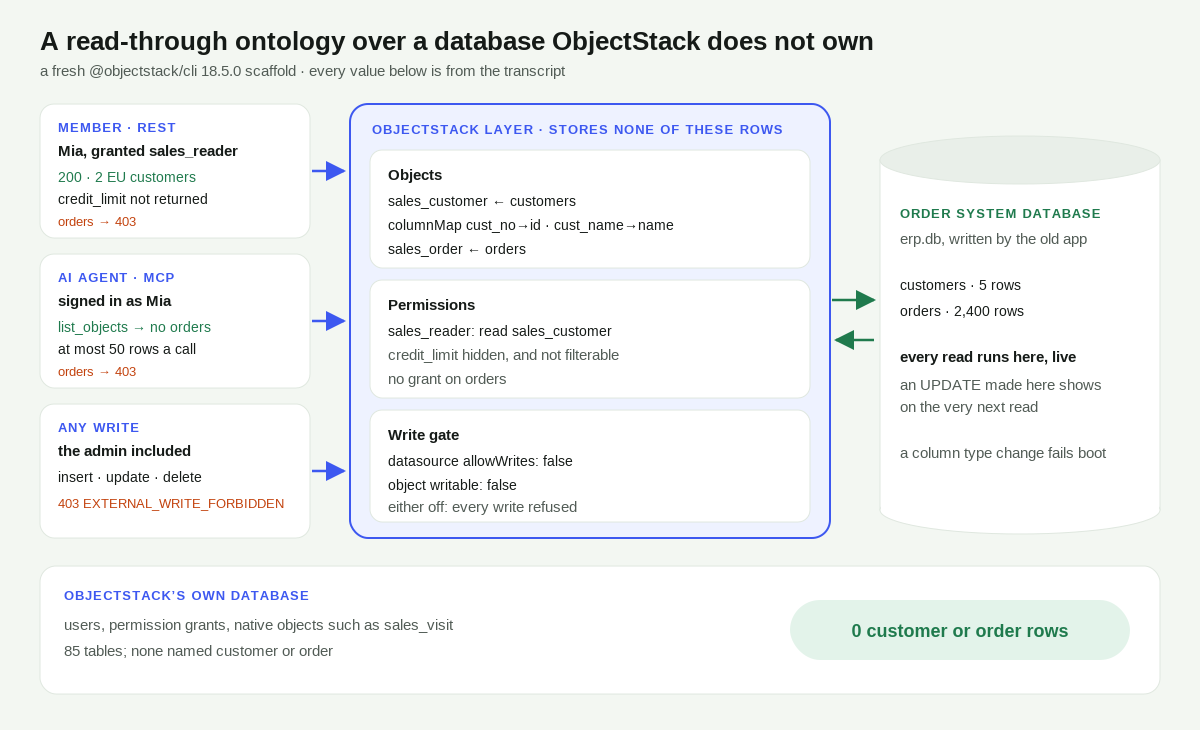
What I connected, and what it answered
The source is a SQLite file written by a short Python script standing in for a legacy order system: a customers table and an orders table, with the cryptic column names old systems have. Three short files did the work. A datasource declares where a database is and what the platform may do there. This one says the schema belongs to the source, so ObjectStack never changes it, and writes are off:
export const Erp = defineDatasource({
  name: 'erp',
  label: 'Order system (SQLite)',
  driver: 'sqlite',
  schemaMode: 'external',            // ObjectStack never runs DDL here
  config: { filename: '/…/legacy/erp.db' },   // absolute path, trimmed
  external: {
    allowWrites: false,
    validation: { onMismatch: 'fail', checkOnBoot: true },
  },
});
An object per table is the business record people, reports and agents ask for by name; each maps the old columns onto plain names, so cust_no becomes id. The platform can list the source’s tables and draft these for you. A permission set is a named bundle of rights you grant to people; this one shows readers the customers but not what they may owe, and nothing on orders.
Then I asked the running app the questions you would ask before signing off: as the administrator, as a member called Mia, and as an AI agent signed in as Mia over MCP, the open protocol AI agents use to call an application’s tools.
| What I did | What the system answered | What it means for you |
|---|---|---|
| Changed a credit limit in the order system itself, then read it through ObjectStack | 95,000 instead of 180,000 on the very next read; no sync ran, and none of the 85 tables in ObjectStack’s own database was a customers or orders table | You read the source, not a copy that can be stale |
| Asked for pending orders with their customers | 480 orders, filtered at the source, each with its customer from the other table | Filters and relationships work on tables you do not own |
| Declared the order date as a date; the source stores text | The app refused to start and named the column | The layer never alters your schema to fit itself |
| Created, edited and deleted as the administrator | All refused, naming both write switches; the source still held 5 customers and 2,400 orders | Nobody writes to the source until you open both switches |
| Read as Mia, before and after granting her the reader permission set | Before: both tables refused. After: two EU customers, no credit limit; orders still refused | Closed until granted; column hiding works on a database the platform did not build |
| Mia filtered, then sorted, by credit limit | Both refused: the answer would leak the value | Filtering or sorting by a hidden figure is refused, so it cannot be guessed that way |
| An agent signed in as Mia listed its objects, read customers, asked for 51 rows, tried a write | Customers and the colleague directory, no orders; two NA customers, no credit limit; over 50 rows refused; write refused | The agent gets no more than Mia’s view, at most 50 rows a call, read-only |
| Asked a dataset (a named set of report figures) for revenue by customer region | APAC 6,127,544.10, EU 11,995,588.50, NA 12,470,792.17, matching the order system’s own query exactly, to two decimals | Reports work across both tables (see limit 1) |
The source database does not know who Mia is: the layer enforces her permissions on every read, and the agent never talks to the database at all.
Where the read-through layer stops
These are the edges I measured, plus two the docs state for drivers I did not run. I never turned the write switches on, so what a write does once both are open is not measured here.
1. No single query joins two databases. The revenue report was not one join sent to SQLite. For a federated object, one bound to an external table, the analytics compiler’s own comment says the dataset is served by “the ObjectQL FK-expand path (two reads, joined in memory)”. The same holds across ObjectStack’s own database and the order system: a native visit object with a lookup to customers expanded the customer and filtered by its region, as separate reads. What does not exist is one statement spanning two databases; the runtime’s design record (ADR) lists it among its non-goals: “cross-datasource JOINs in one query (federated objects are queried per-datasource)”.
2. Large reads are capped on add-on connectors, not on built-in SQL databases. Over the built-in SQLite driver there is no cap: asking for 5,000 orders returned all 2,400, and a cap on that datasource is refused at validation as doing nothing. An add-on connector, which ObjectStack calls a plugin driver, is installed separately, OData included; over one, the guide sets a cap: “A read that matches more rows than the datasource’s row cap is refused with 422 EXTERNAL_ROW_CAP_EXCEEDED rather than answered from a partial set”, “The default is 1000 rows”, at most 10,000. Not run here.
3. “Visible if its parent is visible” works on SQL, and is refused on add-on connectors. Parent-controlled sharing means an order is visible to whoever may see its customer. On an add-on connector the guide says such a read is refused (quoted in The proof). On SQL I measured the opposite: Mia read orders through their customer, and when the customer became invisible to her the orders went with it (next point).
4. Owner-scoped sharing needs an owner column. Make customers private, the drafted object’s default, over a table with no owner column, and Mia read nothing, neither customers nor their orders, while the administrator still read all 5 and all 2,400. The guide warns: “only an owner_id declared in fields, or named by an external.columnMap entry, counts as one. Without it a member reads no row.” Map the source’s owner column, or open the table for reading and narrow it with permission sets, as above.
5. Performance is the source’s. Every read runs on the order system at that moment: a list page reads the rows and the total, and a dashboard someone leaves open is a query on your production database. The layer adds no index the source does not have. If the source cannot take the load, point the datasource at a replica you already operate, or copy the data.
When a copy is the better tool
The ObjectStack guide on virtual objects states the rule in one sentence: “Make the object virtual when a copy would be wrong, and real when a copy is merely convenient”. A copy is wrong when the remote computes the answer at request time, when the data must not be stored outside the source (residency, licence, audit), or when it changes faster than any sync. A copy is convenient for slow-changing reference data, and for reports that join many sources. Read through the first kind; copy the second kind. For a system already switched off, all that is left is an export, and an import mapping and its dry run is how that file lands without its old codes.
Copying in is the other path, and its core ships in 18.5.0: a scheduled job copies a federated object into a synced copy members can read but not write. I did not measure it for this post. ADR-0153’s guideline sends “Reports, analysis, AI question answering, joins across sources; a slow or fragile legacy system” to sync-in, its name for copying in, and “Live data, one table at a time; the legacy system must not be touched; data that must not land” to federation, its name for this read-through binding. Connect existing systems sets the three paths side by side: read live, copy in, or change the source through a declared action.
In development: the rest of sync-in
Not in 18.5.0: marking rows the source deleted (the jobs guide: “The delete keys change nothing yet”), paging for connector sources, whose key can be declared but “nothing reads it yet”, and the sync-in guide and skills. Nothing in this section was measured.
What to read in the diff
If an agent writes the binding, each decision is one line of the diff:
| Line in the diff | What it decides |
|---|---|
schemaMode: 'external' | ObjectStack never alters the source; drift fails boot |
allowWrites / writable | both must be true for any write to reach the source |
columnMap | the business names the source’s columns appear under |
sharingModel | private needs a mapped owner column, or members read nothing |
permission set fields | which source columns a member never sees, or filters on |
rowCap | plugin drivers only; refused on a built-in SQL driver |
Federation lets the ontology name a database you did not build, with the permission model applied to every reader, human or agent.
Point your agent at it
Hand your coding agent the binding as a rule rather than this article: an external datasource, one object per table with remoteName and columnMap, an authored sharingModel, both write switches off, and a permission set per audience. How to configure the coding agent covers the rule file, the MCP endpoint the running app exposes, and the spec; the external datasources guide is the reference the agent should read.
The proof
Everything below is real output from objectstack dev on 18.5.0, on a scaffold from npm create objectstack@latest, trimmed only where marked. $B is the dev server’s address, and sql.py is a three-line Python helper that runs one statement against the file, because the machine had no sqlite3 command.
The source and the dialect
Five customers and 2,400 orders, in this schema:
CREATE TABLE customers (
  cust_no      TEXT PRIMARY KEY,
  cust_name    TEXT NOT NULL,
  cust_region  TEXT,
  credit_limit REAL
);
CREATE TABLE orders (
  order_no   TEXT PRIMARY KEY,
  cust_no    TEXT NOT NULL REFERENCES customers(cust_no),
  amount     REAL,
  status     TEXT,
  placed_on  TEXT
);
I tried Postgres first and the boot said so plainly: “The database client package pg is not installed, so no connection was attempted. It is an OPTIONAL install of @objectstack/driver-sql … npm install pg (pnpm add pg / yarn add pg)”. The guide also documents Oracle and SQL Server as federation-only dialects (“ObjectStack reads an existing Oracle schema live … but it never owns one”), and OData v4 services such as SAP S/4HANA and Dynamics 365 through a shipped driver. I ran none of those three here.
The binding
On the sales scaffold, next to the datasource above, the customer object uses external.columnMap (remote column → local field) turning cust_no, cust_name and cust_region into id, name and region:
export const Customer = ObjectSchema.create({
  name: 'sales_customer',
  label: 'Customer',
  sharingModel: 'public_read',
  datasource: 'erp',
  external: {
    remoteName: 'customers',
    columnMap: { cust_no: 'id', cust_name: 'name', cust_region: 'region' },
  },
  fields: {
    name: Field.text({ label: 'Name', searchable: true }),
    region: Field.text({ label: 'Region' }),
    credit_limit: Field.currency({ label: 'Credit limit' }),
  },
});
sales_order is the same shape over orders, with cust_no mapped onto a customer lookup. The permission set:
export const SalesReader = definePermissionSet({
  name: 'sales_reader',
  objects: { sales_customer: { allowRead: true } },
  fields: { 'sales_customer.credit_limit': { readable: false, editable: false } },
});
The admin route GET …/datasources/erp/external/tables answered customers (4 columns) and orders (5), and POST …/external/tables/customers/draft returned a draft object for the table. The draft keeps the remote names as field names and opens with sharingModel: 'private' (limit 4), so I renamed through columnMap and chose public_read.
Declaring placed_on as a date field failed the boot:
✗ Object 'sales_order' does not match its remote table on datasource 'erp':
✗ type_mismatch: orders.placed_on (expected date, actual text)
That is schemaMode: 'external' working as designed: per the guide, “A mature external DB — DDL forbidden; a schema mismatch fails boot.” I changed the field to text, which is what the order system stores.
Is it live, or a copy?
Read, change in the order system, read again:
curl -s -b admin.cookies "$B/api/v1/data/sales_customer/C-1002"{"object":"sales_customer","id":"C-1002","record":{"credit_limit":180000,"id":"C-1002","name":"Borealis GmbH","region":"EU"}}python3 sql.py erp.db "UPDATE customers SET credit_limit = 95000 WHERE cust_no = 'C-1002'"
curl -s -b admin.cookies "$B/api/v1/data/sales_customer/C-1002"{"object":"sales_customer","id":"C-1002","record":{"credit_limit":95000,"id":"C-1002","name":"Borealis GmbH","region":"EU"}}No sync ran, because there is none. ObjectStack’s own database held 85 tables at that point, and a search of their names for customer or order returned nothing. Filters push down to the source, and a lookup expands across the two remote tables:
curl -s -b admin.cookies "$B/api/v1/data/sales_order?status=pending&top=2&expand=customer"{"object":"sales_order","records":[
{"amount":7020.73,"status":"pending","placed_on":"2026-04-04","id":"SO-00003",
"customer":{"credit_limit":60000,"id":"C-1003","name":"Cyan Pacific","region":"APAC"}},
… one more row, trimmed …],
"total":480,"hasMore":true}Can anything write to it?
As the platform administrator:
curl -s -b admin.cookies -X POST "$B/api/v1/data/sales_customer" \
  -H "content-type: application/json" -d '{"id":"C-9999","name":"Test Co","region":"EU"}'
HTTP 403
{"error":"Write 'insert' blocked on object 'sales_customer': datasource 'erp' is external (schemaMode=external). Requires datasource.external.allowWrites=true (got false) AND object.external.writable=true (got false).","code":"EXTERNAL_WRITE_FORBIDDEN","object":"sales_customer"}A PATCH of C-1002 and a DELETE of order SO-00001 answered the same 403, naming update and delete. The order system still held 5 customers, 2,400 orders and the credit limit it had set itself. The guide: “With either gate off, insert/update/delete on the federated object is rejected.” The design record (ADR) that specifies the mechanism lists among its goals to “Register existing remote tables as ObjectStack objects without touching the remote schema” and to “Default to read-only; require two explicit opt-ins (datasource level + object level) to enable writes.”
What does a member see?
Mia is a member the admin created through POST /api/v1/auth/admin/create-user. With no grant, both objects answer 403 PERMISSION_DENIED: a federated object is denied by default like any other. After the admin grants her sales_reader:
curl -s -b member.cookies "$B/api/v1/data/sales_customer?region=EU"HTTP 200
{"object":"sales_customer","records":[{"id":"C-1002","name":"Borealis GmbH","region":"EU"},{"id":"C-1004","name":"Delta Freight","region":"EU"}],"total":2,"hasMore":false}No credit_limit; orders still answer 403. By indirect question:
curl -s -b member.cookies "$B/api/v1/data/sales_customer?credit_limit=95000"HTTP 403
{"error":"[Security] Access denied: query on 'sales_customer' references field(s) not readable by the caller: credit_limit. Filtering, sorting, grouping, or aggregating by a hidden field would leak its values (filter oracle) — remove these predicates or grant field read access.","code":"PERMISSION_DENIED","object":"sales_customer"}Sorting by it answered the same.
Can an AI agent get around that?
Every ObjectStack app is an MCP server at /api/v1/mcp. Signed in as Mia, an agent’s list_objects answered sys_user, which 18.5.0 opens to an agent so it can find a colleague for a person field, and sales_customer. Then, trimmed to the tool results:
query_records  sales_customer  where {"region":"NA"}  → 2 records: Aurora Labs, Ember Foods (no credit_limit)
query_records  sales_order     limit 1                → {"code":"PERMISSION_DENIED","status":403}
query_records  sales_customer  limit 51               → Too big: expected number to be <=50 at limit
create_record  sales_customer  {"id":"C-9998",…}      → {"code":"EXTERNAL_WRITE_FORBIDDEN","status":403}
Do reports work across the tables?
The dataset, grouping order revenue by a column of the other table:
export const OrderRevenue: Dataset = {
  name: 'sales_order_revenue',
  label: 'Order revenue',
  object: 'sales_order',
  include: ['customer'],
  dimensions: [{ name: 'region', label: 'Region', field: 'customer.region', type: 'string' }],
  measures: [
    { name: 'revenue', label: 'Revenue', aggregate: 'sum', field: 'amount' },
    { name: 'orders', label: 'Orders', aggregate: 'count' },
  ],
};
Asked through the MCP query_dataset tool, and checked against a JOIN run in the order system itself:
| Region | Revenue (dataset) | Orders |
|---|---|---|
| APAC | 6,127,544.10 | 480 |
| EU | 11,995,588.50 | 960 |
| NA | 12,470,792.17 | 960 |
$ python3 sql.py erp.db "SELECT c.cust_region, round(sum(o.amount),2), count(*) FROM orders o JOIN customers c ON c.cust_no=o.cust_no GROUP BY 1 ORDER BY 1"
('APAC', 6127544.1, 480)
('EU', 11995588.5, 960)
('NA', 12470792.17, 960)
The limits, as measured
Across datasources (limit 1): native sales_visit, with a lookup to sales_customer, took ?expand=customer and the nested filter {"customer":{"region":"EU"}}. A dotted filter like ?customer.region=EU, and aggregate_records grouped by customer.region, answered 400 INVALID_FIELD on the native sales_visit exactly as on sales_order, so those two refusals are not federation limits.
Row cap (limit 2): ?top=5000 on orders returned all 2,400 rows. rowCap on the SQLite datasource, at validation:
✗ external.rowCap: `external.rowCap` caps the rows the engine reads from a plugin driver, which it holds behind its correctness floor; the 'sqlite' driver is built in, runs the whole query itself and is never capped, so the key would do nothing here. Remove `rowCap`.Parent-controlled (limit 3): sales_order set to controlled_by_parent through a master_detail to customers; Mia read orders. The guide, for a plugin driver: “A read whose scope composes a ReadableIds leaf, such as an object controlled_by_parent, is refused”.
Owner column (limit 4): with sales_customer set to private, Mia’s answer was {"records":[],"total":0} for customers and for the parent-controlled orders; the admin still read all 5 and all 2,400.
Copy-in, by name (shipped in 18.5.0, not measured here): a job whose pull names a mapping with a datasourceSource reads a federated object in windows and upserts into an object declared managedBy: 'synced', which members can read while the engine refuses their writes with 403; each run leaves a sys_sync_run row with what it read and the position it reached, and the next run reads on from there. The release notes: “A mapping’s datasourceSource now does what it declares”. Jobs declared in an app run only on a deployment that sets OS_AUTOMATION_SCHEDULED_WORK_ENABLED to true, which is off by default.